
Home › Reports › Profits & Cash
Reports from your Tally data
Profit and cash reports. Straight from your Tally data.
See your income, expenses and profit. Check your cash position. Compare months to see what has changed.
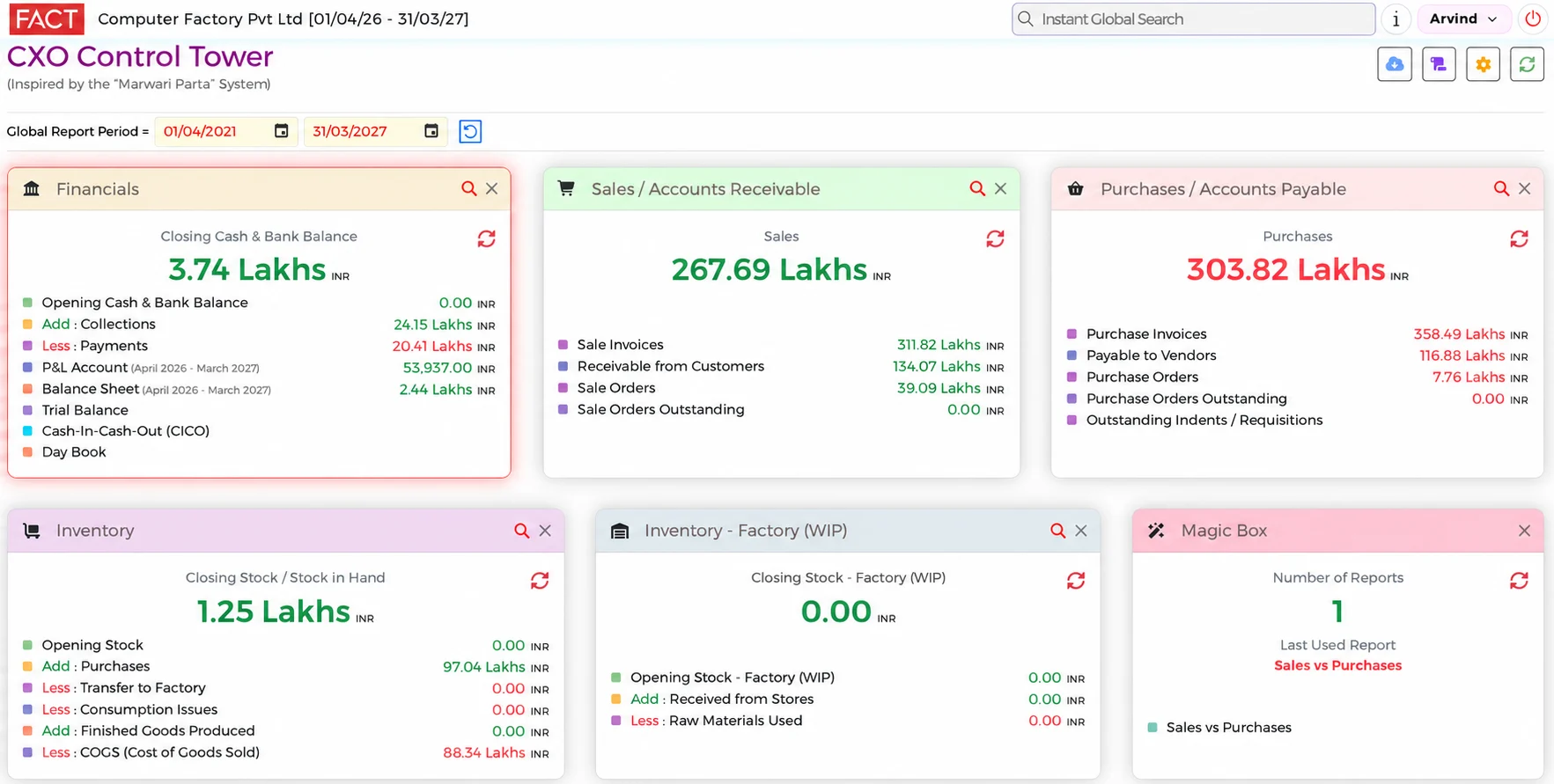
What you can check
- Income, expenses and profit for the period you choose
- Your cash position
- A month-by-month comparison, so you can see what has changed
- The details behind an amount, when you click it
On the example screen, the Financials card shows the closing cash and bank balance, collections, payments, the P&L account, the balance sheet, the trial balance, cash-in-cash-out and the day book. Some features shown may not be part of the Tally plan.
Questions it answers
- How much profit did we make this month?
- Open the profit report. Select the month. See your income, expenses and profit.
- Are we making a profit?
- See your income, expenses and profit in one place, and compare months to see what has changed.
- How much cash do we have?
- Check your cash position without waiting for someone to prepare a report.
Go live in minutes
- Create your accountSign up and add your credit card.
- Find your TallyTell us the Fixed IP where Tally is installed.
- Choose your companySelect your company from the list. The system loads your data automatically.
No customisation. No setup. No IT Specialist needed. You keep using Tally for your accounts. ₹5,000 per month for one company and up to 50 users.